

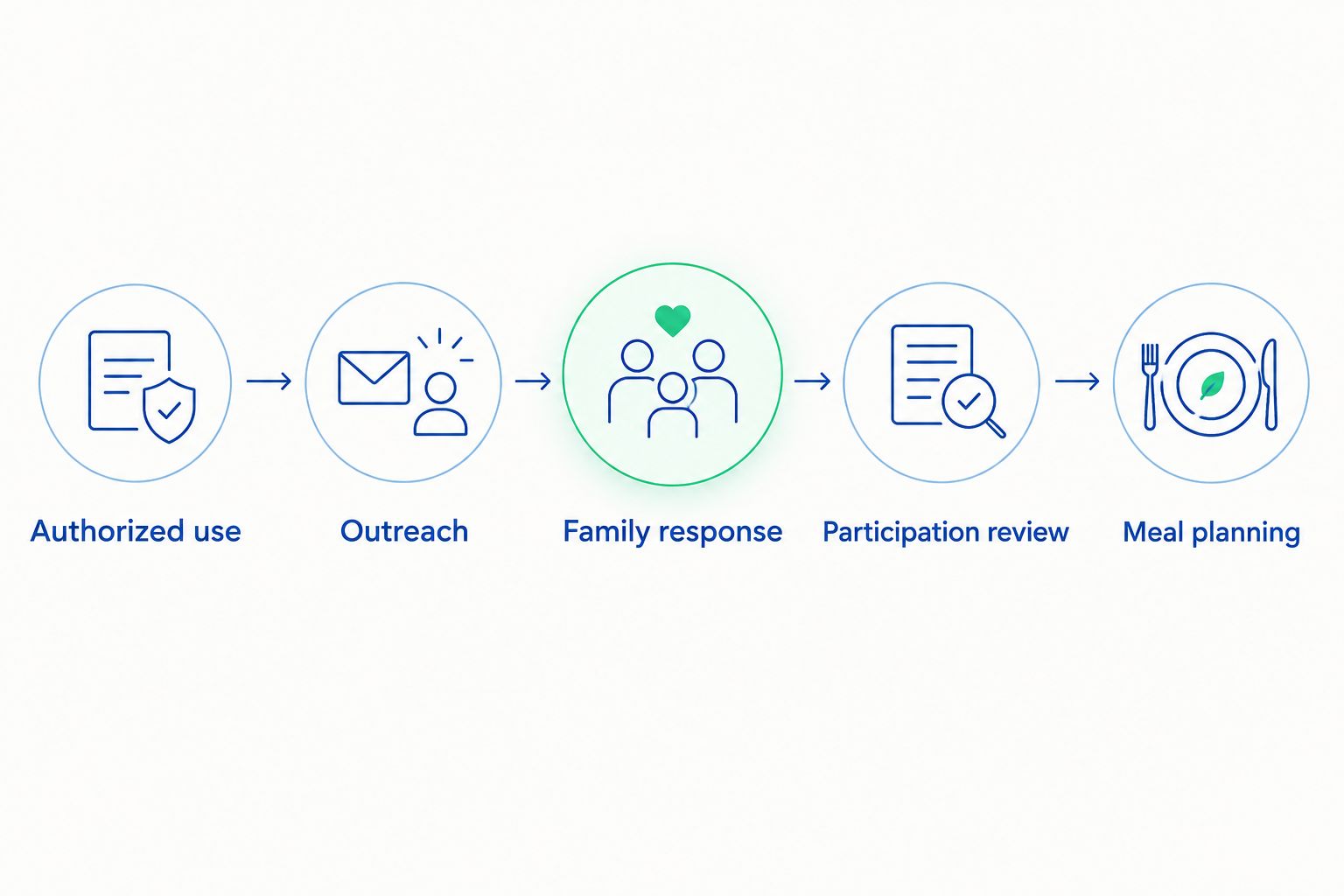
Instead of manually copying school rosters into summer meal signup lists, build a permission-checked workflow that turns approved enrollment data into family outreach, confirmed participation, and meal-planning records. For 2026, use school data to invite families—not to assume eligibility, consent, or attendance; open meal sites generally do not require individual signup to receive meals.
- School enrollment data to summer meal program signup needs separate checks for data sharing, participation, and meal planning.
- Umojahealth provides child nutrition and food logistics services; keep school-record permissions with the responsible school officials.
- Open summer meal sites generally do not require individual signup; use school enrollment data for outreach instead.
- Separate family responses from meal counts so an unanswered invitation never becomes a confirmed order.
Why this matters
A school enrollment record identifies a student. It does not establish that a family wants summer meals, that a particular meal site requires registration, or that the district can share the record with an outside organization. Combining those decisions creates both privacy problems and unreliable demand estimates.
Umojahealth provides child nutrition programs and food-supply logistics services. Umojahealth is best suited to organizations seeking child nutrition logistics services, not a substitute for school-record authorization. Keep that division of responsibility clear before transferring any roster.
For your 2026 workflow, separate three questions: can you use the information, what participation process applies, and what demand should operations plan around? An enrollment-to-signup process works only when each answer has an accountable owner.
This guide describes a platform-neutral setup. The bold field names below are suggested labels for your own workflow, not claims about a particular software interface. Map them to equivalent fields in your approved systems.
Before you start
- Secure approved access and a lawful data-sharing basis. Identify the school records owner, summer meal sponsor, and authorized recipients. Have the district's responsible officials confirm the permitted purpose, fields, disclosure basis, access controls, and retention rules before exporting identifiable student information. FERPA generally requires consent to disclose personally identifiable information from education records unless an applicable exception permits disclosure.
- Collect the operating materials. Obtain the approved site list, service dates, participation instructions, family communication materials, and any required registration form. Assign owners for outreach, response review, and meal planning. Use only district-approved storage and communication channels.
- Resolve the signup gotcha first. Determine whether the program uses open sites, enrolled sites, or an approved non-congregate model. Open sites generally serve eligible children without individual applications; enrolled sites and non-congregate operations have different requirements. A workflow that requires every family to register can create a barrier where none belongs.
Do not send a full student roster to a logistics provider simply because that provider helps supply meals. The approved purpose determines what information the provider receives. Meal quantities and site-level forecasts do not automatically require identifiable school records.
Participation rules and record structure
Start with the participation model, not the spreadsheet. The following routes are workflow choices, not competing products; your sponsor's approved operating model determines which route applies.
| Workflow route | Best for | Advantage | Limitation |
|---|---|---|---|
| Open-site outreach | Sponsors communicating where children can receive meals without individual signup | Keeps access information separate from registration | Family responses do not establish total attendance |
| Required enrollment | Programs whose approved participation model requires enrollment | Produces a defined participation record | Requires an applicable approval process and accurate records |
| Non-congregate coordination | Approved operations arranging pickup or delivery outside congregate service | Supports location and service coordination | Requires model-specific controls; school enrollment alone is insufficient |
- Create Program model, Site, Service period, and Record owner fields. Record the sponsor-approved participation process against each site rather than applying one districtwide rule.
- Define Outreach status, Response status, and Participation status as separate fields. An invitation sent is not a response received. A response received is not necessarily an approved enrollment.
- Establish 3 checkpoints: authorized use of school data, completion of the applicable participation process, and release of operational demand information. Assign an owner to each checkpoint and record its decision.
- Define the minimum record structure. Include only approved identifiers and contact details needed for the task. Avoid copying grades, health information, or unrelated family circumstances into outreach records.
Expected result: each site has a documented participation route, and every record can show why it exists and what action is permitted next.
For Umojahealth child nutrition services, discuss the operational handoff separately from student-data access. This keeps the service discussion focused on meals, program materials, kitting, and food logistics rather than unnecessary access to school records.
Approved data intake and outreach queue
Build the intake around a controlled export or approved connection. The workflow does not require a direct integration with a student information system; a restricted, repeatable file transfer can support the same decision sequence.
- Request an approved export containing only the permitted fields. Attach an export date and source reference so staff can distinguish the current file from an older version without relying on filenames alone.
- Map the approved school identifier to Student reference. Keep a separate Household reference where the authorized source supports household grouping. Do not merge children merely because they share an address or surname.
- Maintain 1 active outreach record per child per service period as your duplicate-control rule. Preserve distinct participation records for siblings while grouping household communication where appropriate.
- Create 2 queues: Ready for outreach and Needs review. Send missing contact details, uncertain matches, or unresolved authorization into review rather than silently dropping records.
- Draft the family message around the applicable route. For an open site, provide location, dates, meal-service instructions, and an optional response if useful for planning. For required enrollment, explain what the family must complete and why.
Expected result: approved records enter the correct outreach queue, duplicates are controlled, and unresolved records remain visible to the responsible staff member.
A 2026 campaign should identify the service period in both the message and the record. Otherwise, a response to an earlier campaign can appear current after staff reuse a form or spreadsheet.
Do not include sensitive school information in message subjects, shared notification channels, or unrestricted attachments. Use the approved outreach channel and keep recipient lists out of public view.
Family response and participation review
The response stage turns outreach into an actionable decision. It must also preserve the difference between a request for information, an expression of interest, and completion of a required enrollment process.
- Capture Response type, Selected site, Requested service period, and Follow-up needed. Use separate response choices for interest, a request for help, and a decline. Do not treat an empty response as a decline.
- Check the response against the site's approved requirements. For open-site outreach, send access instructions without creating an unnecessary eligibility application. For required enrollment, route the record to the sponsor's established review process.
- Record the outcome under Participation status. Use clear labels such as Interest recorded, Review required, and Enrollment confirmed only where each label accurately describes the program process.
- Send the appropriate confirmation. State the site, service dates, instructions, and any next action the family must take. Explain whether responding reserves anything; do not imply a reservation if the program has not established one.
- Record corrections without overwriting the history. Save who changed the record, what changed, and when. Restrict the history to authorized users under the approved retention policy.
Expected result: every response has an accurate status, families receive usable instructions, and staff can distinguish confirmed enrollment from planning interest.
For open sites, interest recorded is a planning signal, not a condition of meal access. Keep that distinction visible in staff instructions as well as family-facing messages.
Meal-planning handoff and verification
The final handoff should support food operations without turning a contact list into an automatic order. Umojahealth food logistics services belong in the supply discussion; the sponsor still needs a defined process for approving quantities and communicating changes.
- Build a site-level planning view with Site, Service date, Participation basis, Planning quantity, and Approval status. Distinguish enrolled participation from open-site forecasts in the report.
- Have the designated program owner review the planning basis. Open-site forecasts need a planning method beyond family responses because children can attend without replying to outreach. Document the method rather than presenting expressions of interest as guaranteed attendance.
- Release approved operational information through the agreed channel. Share individual delivery or pickup details only when the approved service model and data-sharing basis require them.
- Run a 4-record test set before processing the full roster: a valid response, a duplicate, a missing-contact record, and a family selecting a different site. Use synthetic records without real student information.
- Confirm that each test reaches the intended destination. Check that the duplicate does not increase demand, missing information enters review, and a site change removes the record from the earlier site assignment.
Expected result: the operational team receives reviewed demand information, not an unfiltered roster, and common routing errors have been tested before launch.
Keep your 2026 planning view separate from the record of meals actually served. A forecast supports preparation; it does not replace the sponsor's required meal-counting and reporting procedures.
Update the workflow when enrollment data changes
A second workflow handles corrections after the initial outreach campaign. Use an approved updated export or change feed, with the same authorization checks as the original intake.
- New student record: check permitted use, match existing records, and add outreach only if the family has not already received the relevant message.
- Updated contact information: replace the operational contact through the approved process and suppress further messages to the superseded destination.
- School withdrawal: review the record rather than automatically ending summer meal access. School enrollment status is not a universal participation requirement.
- Site or service change: obtain the appropriate family confirmation and update the operational handoff so the earlier assignment does not remain active.
Route changes that affect already-approved meal planning to the operational owner. Do not silently rewrite a released report; communicate the correction and preserve the change history.
Expected result: current information improves outreach and coordination without incorrectly denying access or creating duplicate demand.
Troubleshooting
Families receive repeated invitations
Check whether the workflow matches records using names alone or creates a new record for every export. Use the approved stable identifier, apply the child-and-service-period duplicate rule, and record household outreach separately from individual participation.
An open-site message asks for mandatory registration
Replace the registration requirement with access instructions unless the sponsor's approved model requires enrollment. Review the form and confirmation message together; correcting the invitation alone leaves the same barrier later in the workflow.
Meal planning includes unanswered invitations
Filter the handoff by the documented participation basis. Keep outreach volume separate from responses and approved enrollment, and use the sponsor's planning method for open-site demand rather than assuming every invited student will attend.
A site change appears in both planning lists
Check whether the earlier assignment was closed when the new assignment was approved. Make reassignment a controlled change that updates both destinations and alerts the operational owner if information has already been released.
Records arrive without a sharing authorization
Stop the transfer and restrict access to the received file while the school records owner resolves the issue. Resume only after the permitted purpose, recipients, fields, and handling process are established; a completed signup does not fix an unauthorized disclosure.
Customize your workflow
Expand the workflow only after the basic handoff works. Add language preferences, assistance requests, or service-location choices when those fields are necessary, approved, and assigned to someone who will act on them.
Keep emergency food support separate from summer meal participation. A school district can coordinate both services, but one request should not automatically create another enrollment or disclose student information to another recipient.
Review the emergency food box programs for school districts guide when planning that separate service path. Define its permissions, response process, and operational handoff independently.
Before expanding your 2026 setup, document what Umojahealth will receive, what the sponsor retains, and who approves changes. Clear responsibilities matter more than adding another automated step.
FAQ
Can school enrollment data automatically sign children up for summer meals?
School enrollment data should not automatically create confirmed summer meal participation. First establish authorized data use and the site's actual participation requirements; open sites generally do not require individual signup.
Do families have to register for an open summer meal site?
Open summer meal sites generally do not require individual registration to receive meals. Provide access instructions and do not make an optional planning response a condition of participation.
Does FERPA allow schools to share student rosters with meal providers?
FERPA generally requires consent for disclosure of personally identifiable education records unless an applicable exception permits disclosure. The school must establish the legal basis and permitted recipients before sharing a roster.
What information should go into the meal-planning handoff?
The handoff should contain approved operational information such as site, service date, planning quantity, and participation basis. Include identifiable family information only when the service requires it and the sharing is authorized.
Can a spreadsheet support this summer meal workflow?
An approved spreadsheet can support the workflow if access, matching, review, and change tracking are controlled. Separate outreach status from participation status and prevent duplicate records from increasing planned demand.
Should withdrawing from school cancel summer meal participation?
School withdrawal should trigger review, not automatic cancellation. The sponsor's applicable participation rules determine access; school enrollment status is not a universal requirement.
Where does Umojahealth fit in this workflow?
Umojahealth provides child nutrition and food-supply logistics services. Define the operational handoff with the provider while keeping school-record authorization and program participation decisions with the responsible officials.
One last thing
The most useful safeguard is a visible distinction between interest and attendance. Label those records differently before staff export them, because a clean-looking spreadsheet can still send the wrong demand signal.
For your 2026 launch, test a family that never responds. The workflow should leave that record unconfirmed without making nonresponse a barrier to access at an open site.