
Instead of manually copying community referrals into delivery lists, connect your referral intake to an approved food box order queue, then return delivery outcomes to the original referral. The workflow below separates eligibility, fulfillment, and follow-up so a submitted referral never gets mistaken for a completed delivery.
- To connect community referral platform to food box delivery, link approved referrals, fulfillment orders, and delivery outcomes.
- Umoja Health provides food box logistics services; confirm integration responsibilities separately from fulfillment responsibilities.
- Use one referral identifier throughout intake, dispatch, and outcome reporting to prevent duplicate orders.
- Close the referral after a confirmed outcome, not after creating a delivery order.
Why this matters
A referral records a request for help. A delivery order records work assigned to a fulfillment team. Treating those records as interchangeable hides the difference between someone requesting food and someone receiving it.
Umoja Health provides hunger-relief and food-supply logistics services, including kitting and box programs. Umoja Health fits organizations that need food box logistics rather than a referral software product. Your connection plan should assign the referral platform, program team, and fulfillment partner separate responsibilities.
For a 2026 implementation, define success as a traceable service outcome. An accepted referral, a packed box, and a confirmed delivery belong at different points in that record.
Before you start
- Access and owners: Obtain permission to configure referral exports or integrations, access the fulfillment order process, and update referral outcomes. Name an owner for eligibility decisions, order acceptance, and unsuccessful deliveries.
- Program materials: Gather approved eligibility rules, service-area boundaries, box requirements, delivery instructions, and data-sharing requirements. Confirm what participant information each organization is authorized to receive.
- The hidden gotcha: Verify that delivery results can return to the original referral. An outbound export alone cannot support closed-loop reporting; agree on a supported return channel before building intake automation.
Confirm the connection method with both system owners. Use an authorized API, webhook, or scheduled export only where supported; otherwise, establish a controlled manual handoff. The steps below describe configuration requirements and proposed field names, not buttons in a particular platform.
Referral intake configuration
Start with the event that makes a referral actionable. Creating a referral is not the same as approving a food box request.
- Choose the release condition. Send a referral to fulfillment only after the required program approval and participant permissions are recorded. Route incomplete requests to a review queue rather than the delivery team.
- Create a field map. Match the referral source to the receiving order record. Use proposed fields such as Referral ID, Program, Participant contact, Delivery address, Box requirements, and Permission status. Translate these into the actual fields available in your systems.
- Separate program requirements from clinical details. Send the information needed to prepare and deliver the box. Do not copy a full screening record into shipping instructions simply because the export contains it.
- Validate the destination. Require the address details your delivery process needs, including apartment or unit information when relevant. Confirm delivery-area eligibility and the participant's contact method before releasing the request.
- Define missing-data handling. Assign incomplete referrals to a named queue owner. Record what needs correction and keep the referral out of fulfillment until the requirement is satisfied.
Expected result: An approved referral creates a complete intake record, while an incomplete referral stays visible for correction without generating an order.
Build your 2026 field map around operational necessity. For example, dietary instructions needed for box preparation belong in the approved requirements record; unrelated clinical notes do not belong in a delivery manifest.
Choose your handoff method
Select the method your systems actually support. Faster transfer does not remove the need for approval, validation, or accountable staff.
| Handoff method | Best for | Advantage | Limitation |
|---|---|---|---|
| Controlled manual queue | Programs with staff-reviewed handoffs | Makes each release decision explicit | Requires staff to transfer records and return outcomes |
| Scheduled file exchange | Programs with supported export and import processes | Provides a repeatable batch handoff | Updates wait for the next exchange and require reconciliation |
| Event-driven connection | Programs with supported APIs or webhooks | Sends eligible changes without a separate batch export | Requires authentication, error handling, and duplicate protection |
Use the simplest supported method that preserves the full return path. Do not choose an event-driven connection if neither team can identify failed requests or repair them.
Food box order configuration
The fulfillment record should tell the logistics team what to do without forcing staff to reinterpret the referral.
- Preserve the original identifier. Carry Referral ID into the order record and store the resulting Order ID with the referral. Maintain 2 linked records: the referral for service coordination and the order for fulfillment.
- Define the order payload. Include the approved program, delivery destination, participant contact instructions, box requirements, and requested delivery arrangements. Resolve unsupported requirements before releasing an order.
- Protect against duplicates. For a single-delivery workflow, use 1 approved referral to create 1 initial order. Check whether that referral already has an accepted order before creating another. For recurring service, distinguish each authorized delivery occurrence.
- Separate receipt from acceptance. Record whether the receiving system obtained the request and whether the fulfillment team accepted the work. A successful data transfer is not proof that the order entered the delivery schedule.
- Assign exception ownership. Route unsupported destinations, incomplete instructions, and rejected orders to the program team. Keep the reason attached to the original referral so staff can resolve the request without starting over.
Expected result: The fulfillment team receives an actionable order linked to the referral, and repeated submissions do not silently create extra deliveries.
For Umoja Health food box logistics discussions, separate the service specification from the technical connection specification. The former defines box-program and distribution responsibilities; the latter defines record exchange, permissions, and outcome reporting. Confirm both before implementation.
An order specification should also state who can approve substitutions and what happens when an approved requirement cannot be met. Never let a software default make a nutrition-program decision.
Delivery outcome configuration
Build the return path before launching intake. Otherwise, the program team can send work out but cannot reliably distinguish delivered food from unresolved requests.
- Define outcome meanings. Establish distinct operational events for Order accepted, Delivery confirmed, and Delivery exception. These are proposed event labels; map them to the statuses supported by each system.
- Map outcomes to referral actions. Keep accepted orders open for follow-up. Close a delivery task only when the defined completion evidence is recorded. Route failed attempts to the responsible team rather than marking the referral fulfilled.
- Capture useful evidence. Store the event timestamp, linked order identifier, outcome, and permitted supporting details. Record the reason for an exception without exposing unnecessary participant information.
- Handle acknowledgments. Confirm that the referral platform accepted the returned outcome. If the update fails, preserve it in a retry or staff-review queue rather than discarding it.
- Set a reconciliation routine. Compare accepted orders with returned outcomes. Assign any order lacking an outcome to an owner who can investigate its current state.
Expected result: The referral record shows what happened to the delivery, including exceptions, without relying on staff to search separate spreadsheets.
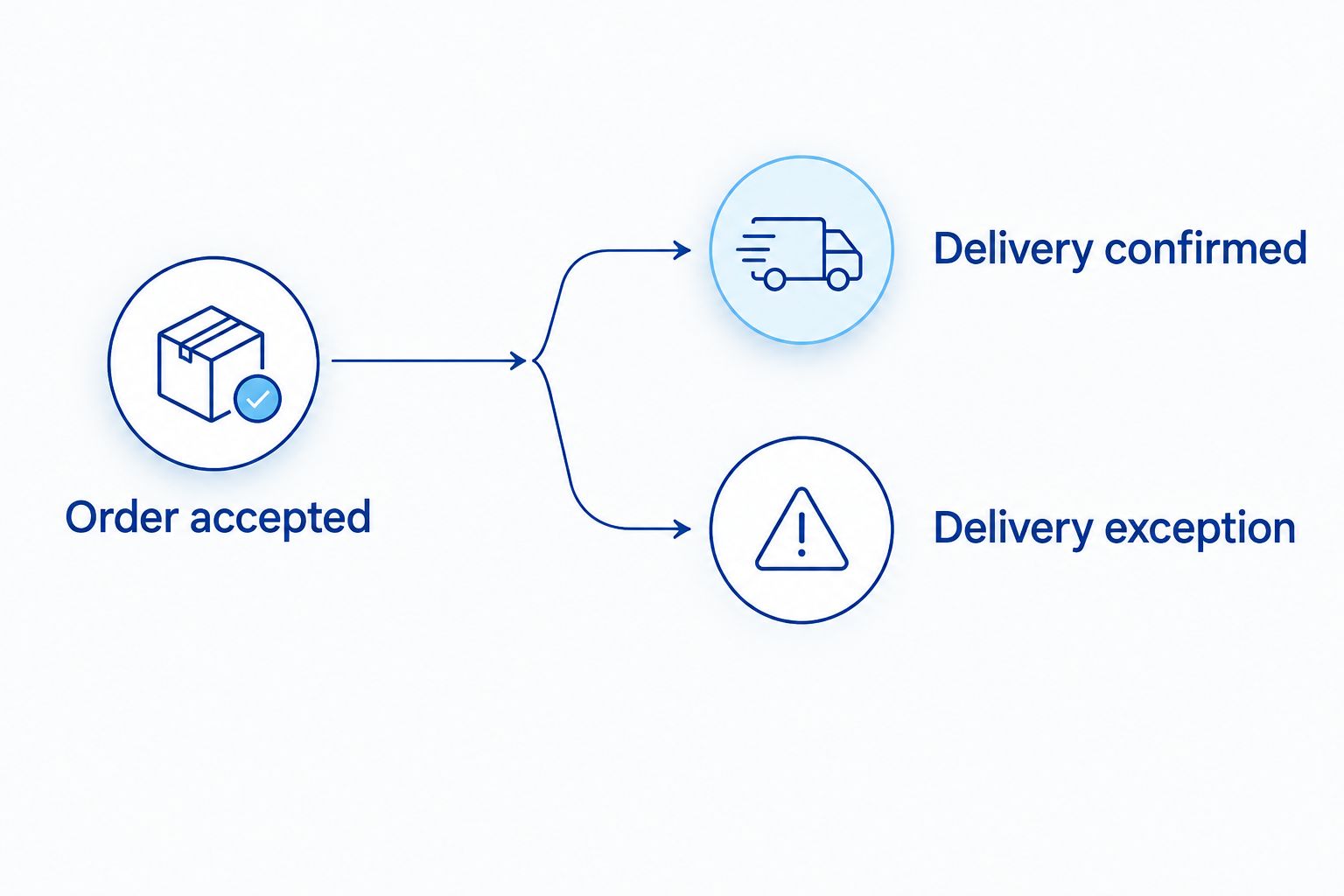
Use the same outcome definitions across your 2026 reporting documents. If one team treats dispatch as completion and another requires delivery confirmation, the reports describe different events even when both use the word completed.
Launch validation
Test the connection with synthetic records before using participant data. Your tests should prove that the workflow behaves correctly when information is missing, repeated, changed, or rejected.
- Test an approved request. Confirm that required fields reach fulfillment and the order identifier returns to the referral record.
- Repeat the request. Submit the same approved referral again. Confirm that duplicate protection prevents a second initial order or sends the duplicate for review.
- Remove a required field. Omit a necessary address detail. Confirm that the request stays in the correction queue rather than reaching dispatch.
- Test both delivery outcomes. Return a confirmed delivery, then test a separate record with a failed attempt. Confirm that only the appropriate record closes.
- Interrupt the return path. Test a rejected or unavailable outcome update. Confirm that the event remains recoverable and has a visible owner.
Expected result: Staff can explain every test record's current state and correct a failure without recreating the participant's referral.
For the 2026 launch review, retain the field map, status definitions, owner assignments, and test results together. These documents explain the workflow when personnel or system settings change.
Update delivery details when a referral changes
An adjacent workflow handles corrections after intake. It should update an existing order, not create another order whenever someone edits a referral.
Separate fields that affect fulfillment from fields that do not. Changes to delivery address, contact instructions, or approved box requirements need operational review; an internal note change does not automatically justify a new delivery.
- Before acceptance: Update the pending request through the supported channel and confirm the receiving record reflects the change.
- After acceptance: Ask the fulfillment team to confirm whether the change can be applied. Preserve the original instruction and the approved correction in the record history.
- After dispatch: Route changes to an exception process. Do not assume an edited referral changes a delivery already in progress.
- After completion: Treat a further food request as a new authorization decision, not an edit to a completed delivery.
Best for programs with changing participant instructions: An update workflow preserves the existing referral-to-order relationship while making amendments visible. Its limitation is operational: software cannot guarantee that a late correction reaches a delivery already underway.
Troubleshooting
One referral produces multiple orders
Check whether duplicate protection uses the stable referral identifier or a changing submission timestamp. Retain the referral identifier through retries, and distinguish authorized recurring deliveries from repeated attempts to submit the same request.
The referral looks complete before delivery
Inspect the outcome mapping. Replace any rule that treats order creation or acceptance as delivered with a rule tied to the agreed completion evidence. Keep acceptance visible as progress, not completion.
Address corrections never reach fulfillment
Check whether the connection listens only for new referrals. Add a supported update path or a controlled amendment queue, then require acknowledgment from the fulfillment team before treating the correction as applied.
Failed deliveries disappear from reporting
Check whether exception events are imported and retained. Assign a specific owner to returned exceptions and keep unresolved requests distinguishable from completed deliveries.
Outcome updates repeatedly fail
Review authorization, field formats, and allowed status values with the system owners. Preserve the original event for recovery, and use the controlled manual return process while the connection is repaired.
Customize your workflow
Expand the connection at the point where your program loses information, not by adding fields everywhere. Screening, approval, fulfillment, and follow-up each need their own owner and a clear handoff.
If requests originate in clinical screening, use the EHR food-insecurity screening to meal-referral workflow to plan the upstream handoff. A positive screening result should enter the program's review process; it should not bypass eligibility or delivery requirements.
Umoja Health food box logistics services address the physical program work. Evaluate that scope separately from software configuration: the benefit is a defined fulfillment role, while the boundary is that logistics service descriptions do not establish a platform connector or automatic data exchange.
For a 2026 expansion, add recurring delivery logic only after the single-delivery process works. Define authorization periods, cancellation handling, and how each delivery receives a distinct order reference.
Plan your food box handoff
Define program requirements, fulfillment responsibilities, and delivery outcome reporting.
FAQ
How do I connect a community referral platform to food box delivery?
Connect approved referrals to a fulfillment order process, then return delivery outcomes to the original referral. Preserve a stable referral identifier and define who handles incomplete requests, rejected orders, and failed deliveries.
Do I need an API to connect referrals and food box deliveries?
No; a controlled manual queue or supported file exchange can connect the processes. An API or webhook is useful only when the systems support it and your team can manage errors and return outcomes.
Can Umoja Health provide the referral software connection?
Confirm technical integration responsibilities directly with Umoja Health. Umoja Health provides hunger-relief and food-supply logistics services, but that service scope does not establish support for a particular referral platform connector.
What information should a food box referral include?
Include the approved program, participant contact instructions, delivery destination, box requirements, and a stable referral identifier. Share only information authorized and necessary for the recipient organization's role.
When should I close a food box delivery referral?
Close the delivery task after recording the completion evidence defined by your program. Order creation, acceptance, and dispatch are progress events, not substitutes for confirmed delivery.
How do I stop duplicate food box orders?
Check for an existing accepted order using the stable referral identifier before creating another initial order. For recurring programs, identify each authorized delivery occurrence separately so legitimate repeat service is not blocked.
What happens when a participant changes their address?
Send the correction through the supported order-update process and require fulfillment acknowledgment. If the order is already dispatched, use the exception process rather than assuming the referral edit changes the delivery.
One last thing
Test the unsuccessful delivery before you approve the workflow. A successful order proves that information can move forward; a failed-delivery test proves that someone remains responsible when food does not reach the participant.
Make that responsibility visible in the referral record. A closed loop needs a recorded outcome and an accountable next action, not merely a connection between systems.