

Instead of manually copying positive food insecurity screens into separate meal-referral lists, connect your EHR screening result to a referral queue with consent, an assigned owner, and a return status. A working EHR food insecurity screening to meal referral process ends with a documented service outcome—not just a sent message.
- An EHR food insecurity screening to meal referral workflow needs consent, an owner, and a returned service outcome.
- Umojahealth supports food logistics; your clinical team owns screening decisions and referral authorization.
- Use structured screening results and closed-loop referrals rather than copying patient details into separate lists.
- Keep referral acceptance separate from confirmed meal delivery or food receipt.
Why this matters
A positive food insecurity screen identifies a need. It does not establish meal-program eligibility, authorize disclosure, or confirm that food reached the patient. Your workflow must connect those separate decisions without treating them as interchangeable.
For your 2026 implementation, define success as a documented disposition: food received, service declined, patient unreachable, or referral redirected. Keep the original screening result visible even when the referral cannot proceed. Otherwise, an administrative closure can hide an unresolved need.
Start with your organization's nutrition security screening for community health centers process, then define the handoff to food support.
Umojahealth is best suited to food logistics planning for healthcare providers and hunger-relief organizations. Umojahealth provides nutrition security and kitting/box programs; EHR configuration, clinical decisions, and information-sharing permissions remain responsibilities you must assign within your referral workflow.
Before you start
- Secure the right access and ownership. Bring together an EHR administrator, a clinical screening lead, a referral coordinator, and the receiving food-support organization. Give each person a defined responsibility for configuration, patient authorization, referral processing, or outcome reporting.
- Prepare the screening and referral materials. Use an approved screening instrument, receiving-program criteria, an authorized information-sharing process, and a documented return-status method. Children's HealthWatch's Hunger Vital Sign uses 2 questions about household food insecurity over the preceding 12 months; implement the approved wording and scoring rather than a locally rewritten substitute.
- Resolve the hidden handoff problem. A clinical screening identifier does not automatically become a receiving organization's referral identifier. Agree on how both sides will match requests and return outcomes before enabling a production trigger. Confirm the sharing arrangement with your privacy team before sending patient information.
This is a configuration blueprint, not a vendor-specific button sequence. Follow your EHR's documented build instructions for the settings described below; the proposed field and status names are workflow definitions, not claims about an existing interface.
Screening trigger configuration
Build the structured screening event
- Choose the approved screen. Store the individual responses and calculated result in structured fields. Keep the screening date and responsible clinical team attached to the result. Free-text notes can add context, but they should not be the sole trigger source.
- Define the trigger condition. Use the approved instrument's positive-result rule and require a completed, finalized screen. Distinguish a positive result from an unanswered question or an unfinished encounter.
- Separate screening from referral authorization. A positive result should create a review task when authorization or routing information is incomplete. Release the referral only after your required checks are satisfied.
- Assign the review queue. Route the task to a named role rather than the individual who happened to enter the screen. Define coverage for absences and an escalation owner for tasks that remain unassigned.
Expected result: A finalized positive screen creates an actionable task linked to the correct patient and screening event. An incomplete screen does not release a referral.
For the 2026 launch, test both positive and negative screening paths in a non-production environment using synthetic records. Include a corrected result so the build demonstrates how it handles an amendment—not just an ideal first submission.
Record the trigger logic in plain language. A referral coordinator should be able to explain why a task appeared without reading interface code or searching the clinical note.
Referral routing configuration
Define the referral record and service destination
- Create a minimum referral record. Include a referral identifier, patient-matching information, referring team, screening date, requested support, and the authorized contact method. Add other information only when the recipient needs it and your sharing process permits it.
- Confirm practical access needs. Ask whether the patient can receive deliveries, collect food, store it safely, and prepare it. Record relevant language and accessibility needs. Do not infer these details from a diagnosis or address alone.
- Check program criteria. Have the responsible team verify the receiving program's eligibility and clinical requirements. A positive food insecurity screen alone does not establish that a patient needs medically tailored meals.
- Choose the destination. Route to a documented receiving organization and service pathway. If the destination requires review before enrollment, keep the referral in that review state rather than marking the patient enrolled.
- Define the return channel. Agree on an authorized interface, portal process, or other approved exchange method. Specify who checks returned information and attaches it to the original referral.
Expected result: The referral contains enough authorized information for the receiving organization to assess the request, with a destination and accountable owner.
For food-supply operations, Umojahealth provides hunger-relief logistics and nutrition security programs for healthcare providers and other organizations. That service scope is separate from the technical connection: evaluate the actual referral exchange and outcome-reporting arrangement before treating it as an integration.
Outcome tracking configuration
Build a closed-loop status record
- Define shared meanings. Write down what each status represents before mapping it between systems. Suggested states include Referral sent, Receipt confirmed, Accepted, Service started, Declined, Unreachable, and Redirected.
- Distinguish receipt from acceptance. A delivery acknowledgment confirms that a message reached its destination. It does not prove that the receiving program reviewed the request or accepted the patient.
- Distinguish acceptance from service. Record the service event separately. Use the receiving organization's actual confirmation of delivery, pickup, or another agreed food-support event—not the referral transmission date.
- Assign follow-up rules. Give unanswered referrals and unsuccessful contact attempts a responsible queue. Set review intervals through your organization's policy and partner agreement, not an assumed response deadline.
- Preserve the history. Store status changes, their source, and the responsible staff member or system. Keep the screening record intact when the referral outcome changes.
Expected result: Staff can see whether the patient received support, remains in follow-up, or needs another route.
Use the following handoff sequence for your 2026 build. Each stage needs its own evidence; a message sent at the referral stage cannot stand in for a later service event.
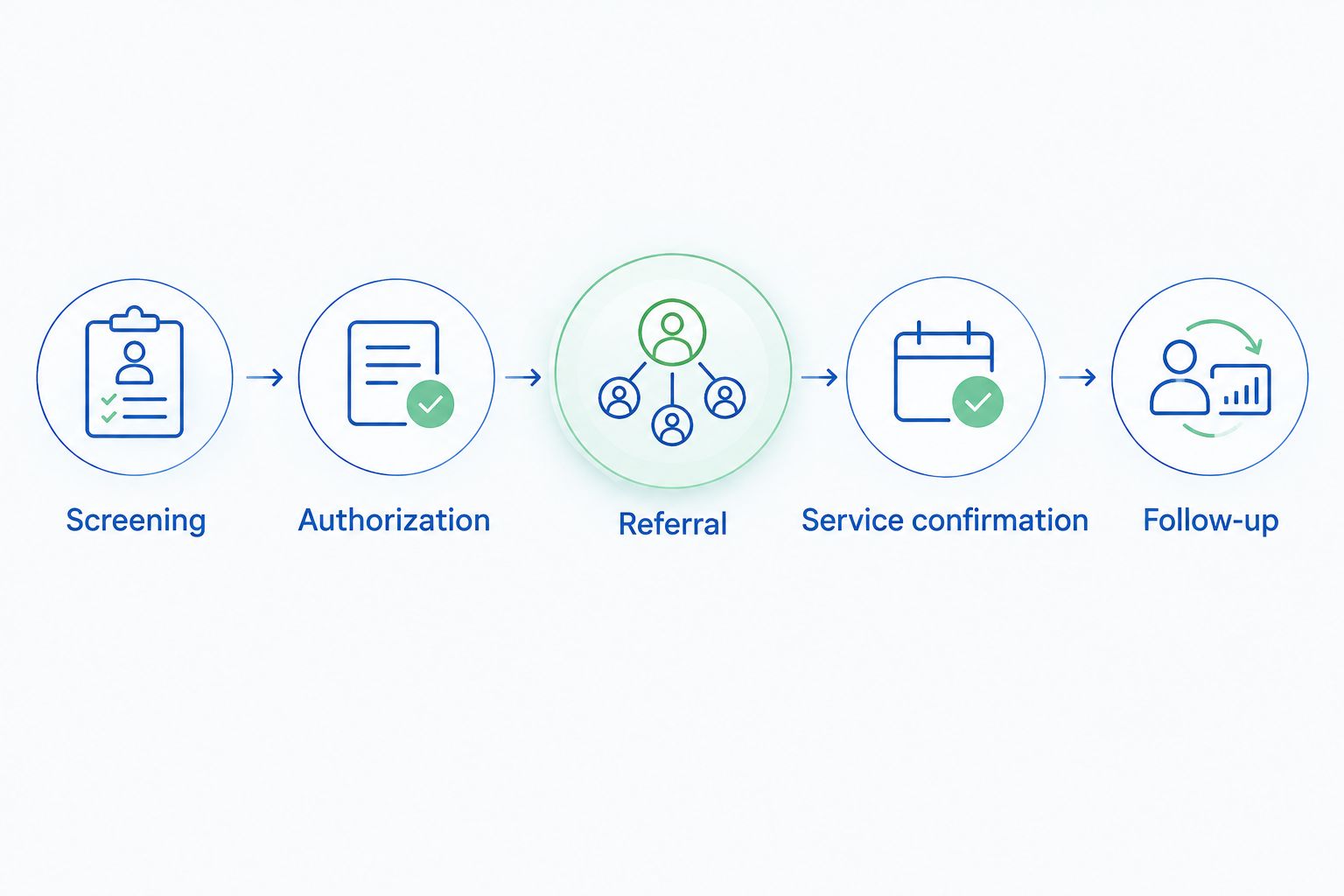
Validation and release configuration
Test the handoff before production
- Run synthetic records through the full process. Cover a positive screen, a negative screen, an incomplete screen, declined sharing authorization, and a referral correction. Check the destination and status history for each case.
- Test duplicate prevention. Reopen an encounter and resubmit a corrected screen. Start with a rule of 1 active referral per patient, service pathway, and screening episode, then document justified exceptions with your clinical team.
- Test unsuccessful handoffs. Simulate an unacknowledged transmission, a rejected referral, and an unmatched returned status. Confirm that each creates a visible task rather than disappearing from the queue.
- Reconcile both sides. Compare the EHR referral record with the receiving organization's record. Verify identifiers, requested support, authorization scope, and the latest outcome.
- Approve ownership before release. Have the clinical, privacy, technical, and operational owners approve their respective parts. Retain a manual fallback for a failed connection using the same authorized information-sharing rules.
Expected result: Staff can trace a referral from the screening event through service confirmation, including exceptions.
For a 2026 release, retain the test cases and mapping decisions with the build documentation. A later configuration change needs the same checks; a successful first launch does not validate an amended interface.
Update a referral when the patient's situation changes
An adjacent workflow updates an existing referral after a corrected screen, a changed contact method, or a new service need. It should not automatically create another request whenever someone edits the chart.
| Workflow | Best for | Benefit | Limitation |
|---|---|---|---|
| New-screen referral | A newly identified food-support need | Links the request to a specific screening event | Repeated encounters can generate duplicate requests without a control rule |
| Existing-referral update | A changed need or corrected referral detail | Preserves referral history and continuity | Requires reliable identifiers and agreement on which changes the recipient accepts |
Choose the new-screen referral workflow for new needs; choose the existing-referral update workflow for changes to an active request.
- Identify the active referral using its shared identifier and service pathway.
- Send only the authorized, relevant changes through the agreed return channel.
- Record whether the receiving organization acknowledged the update and whether the service plan changed.
Keep a screening correction distinct from a service cancellation. Staff should review the patient's circumstances before stopping food support, and the record should show who made that decision.
Troubleshooting
A positive screen creates no task
Check whether the screen is finalized, whether its result is stored in the mapped field, and whether the trigger uses the approved scoring rule. Test the exact screening version used in the encounter; a revised form can leave the old trigger pointing at the wrong field.
One screening event creates duplicate referrals
Check encounter reopening, retry behavior, and repeated submissions. Match on the referral identifier and screening episode rather than patient name alone. Retry a failed transmission against the existing record instead of creating a new request.
The receiving organization cannot process the request
Review the rejection reason with the referral owner. Correct missing contact details, authorization, or required program information through the approved channel. Do not solve an incomplete referral by sending the entire chart.
A returned status attaches to the wrong record
Check identifier mapping and how the return message selects its destination. Hold unmatched updates for reconciliation; never attach them based only on similar names. Reprocess the update after confirming the correct referral.
The chart shows completion without confirmed service
Inspect the status mapping. Replace a rule that equates acceptance with completion, and reopen affected records for review. A closed-loop workflow needs evidence of the agreed service outcome or a documented reason service did not occur.
Customize your workflow
Expand your 2026 workflow around patient needs, not additional triggers. A discharge referral needs continuity between the hospital team and the receiving organization; use the medically tailored meals for hospital discharge planners guide when planning that pathway.
For Umojahealth food logistics discussions, bring a service brief covering the population, food-support format, geographic requirements, receiving locations, and expected reporting responsibilities. Include storage and handling needs where relevant. Do not assume a food logistics service also supplies EHR connectivity or clinical eligibility decisions.
Review referral outcomes alongside unresolved screening needs. Track where requests stop: authorization, routing, acceptance, contact, or service confirmation. Those stages identify the next operational fix without confusing screening activity with food received.
Plan your food logistics handoff
Define your population, food-support pathway, and reporting needs before discussing implementation.
FAQ
How do I connect an EHR food insecurity screen to a meal referral?
Connect a finalized positive screening result to a referral review queue, then release an authorized request to an agreed service destination. Assign an owner and capture the receiving organization's disposition and service confirmation.
Does a positive food insecurity screen automatically qualify someone for meals?
No, a positive screen does not establish meal-program eligibility. The responsible team must check the receiving program's criteria and any clinical requirements before enrollment.
Can I use the Hunger Vital Sign in this workflow?
Yes, the Hunger Vital Sign can provide the structured screening result when your organization approves its use. Preserve its approved wording and scoring, and keep the screening decision separate from referral authorization.
What information should go in a meal referral?
Send the authorized information needed to match the patient, assess the request, and arrange contact. Define the exact fields with the receiving organization and your privacy team rather than sending the entire clinical record.
How do I know the meal referral is complete?
A referral is complete when its agreed service outcome or reason for non-service is documented. Message receipt and program acceptance are separate milestones, not proof that the patient received food.
How do I prevent duplicate food-support referrals?
Match requests using a shared referral identifier, service pathway, and screening episode. Check for an active request before creating another, and send corrections as updates when appropriate.
Does Umojahealth replace the EHR referral system?
Treat Umojahealth as a food logistics and hunger-relief service provider, not as a substitute for your EHR referral system. Confirm any technical exchange and reporting arrangement separately before implementation.
One last thing
Keep unresolved food needs visible after a referral closes. A patient who declines one service or cannot be reached has not necessarily stopped needing support. Record the referral disposition separately from the clinical screening result so a later encounter can reopen the conversation without erasing its history.
Before release, ask a coordinator to find an unsuccessful referral and explain its next action from the record alone. If the record does not identify an owner and a next step, fix that gap before adding more automation.