

Instead of manually reconciling renewal lists with delivery rosters, connect OAA eligibility renewal to senior meal delivery through a reviewed service authorization, a validated delivery record, and an exception queue. Keep eligibility decisions with the responsible aging-services agency and send meal operations only the approved instructions needed to fulfill service.
- OAA eligibility renewal to senior meal delivery needs an approved handoff, not an automatic stop tied to a review date.
- Umoja Health fits organizations seeking hunger-relief program and food-supply logistics services.
- Separate eligibility review, service authorization, and delivery status so each team knows what requires action.
- Use local OAA program rules; age alone does not establish home-delivered meal eligibility.
Why this matters
A renewal record and a delivery roster answer different questions. The renewal record documents the agency's assessment; the roster tells meal operations where, when, and what to deliver. Treating those records as interchangeable creates avoidable handoff errors.
For your 2026 workflow, separate the decision to authorize service from the work of scheduling it. A review coming due should create a staff task. Whether service continues, changes, or ends must follow the administering agency's rules and documented decision—not a generic automation rule.
Umoja Health is best suited to organizations seeking hunger-relief program and food-supply logistics services. Start with Umoja Health when assessing that operational role; keep OAA eligibility authority assigned to the administering agency.
Federal OAA nutrition guidance identifies adults aged 60 years and older as the principal population served, with additional eligible groups under specified circumstances. OAA nutrition services are not means-tested. Home-delivered meal criteria, assessment procedures, and review schedules still require the applicable state and local program guidance.
Use Administration for Community Living guidance for the federal framework and your administering agency's current instructions for local decisions. Before activating a 2026 workflow, record which guidance governs the program and who resolves conflicting instructions.
Before you start
- Assign decision and delivery owners. You need access to the participant assessment record, the agency's service-authorization process, and the meal provider's scheduling process. Identify who can approve service, who can change delivery instructions, and who handles unresolved reviews.
- Prepare a controlled handoff record. Gather the participant identifier, authorized service, effective dates, delivery address, contact instructions, and relevant dietary requirements. Confirm your permitted data-sharing scope before sending information outside the agency.
- Resolve the renewal-date gotcha. A review date is not automatically a service-end date. Document how pending reviews, unreachable participants, and incomplete assessments affect service under local rules before configuring any stop instruction.
This guide uses proposed worksheet labels, not the interface of a named software product. Create those labels in your existing system or map them to equivalent fields. Do not assume that an eligibility platform and a delivery platform share identical status meanings.
Use 1 participant identifier across the handoff wherever your systems permit it. Names and addresses support verification, but neither is a dependable replacement for a stable identifier.
Choose your handoff method
Choose the simplest method your team can supervise. An automated transfer is useful only when the receiving system can distinguish an approved instruction from an incomplete review.
| Handoff method | Best for | Advantage | Limitation |
|---|---|---|---|
| Controlled worksheet | Teams coordinating through an agreed shared record | Staff can inspect decisions and exceptions directly | Requires disciplined updates and access controls |
| Reviewed batch transfer | Agencies sending approved changes together | Separates staff approval from delivery-system entry | Changes wait until the batch is processed |
| Event-driven transfer | Teams with compatible systems and a maintained integration | Sends an approved change when its status changes | Requires duplicate prevention, error handling, and monitoring |
Use a controlled worksheet until ownership and status definitions are settled. Moving ambiguous records faster does not make them correct. Keep the same approval requirement when you later change the transfer method.
Umoja Health's stated services cover hunger relief and food-supply logistics. Assess that service role separately from any software connection: an integration requires confirmed capabilities, permissions, and responsibilities from every participating organization.
Renewal review configuration
- Create a Review due field for the next assessment or renewal required by your administering agency. Record the applicable rule separately rather than assuming every participant follows an annual schedule.
- Add Review status with clearly defined values such as pending, in progress, and completed. These are proposed workflow labels; document their meaning before staff use them.
- Create an Assigned reviewer field. Every pending review needs a named owner or an accountable team queue, including records that arrive through a batch import.
- Configure the review trigger to create a task when the locally required review becomes due. Keep that trigger separate from any service-change instruction.
- Record the assessment outcome and the information supporting it in the agency's participant record. Route uncertain cases to the authorized decision-maker instead of asking meal operations to interpret eligibility.
Expected result: a due review produces an owned assessment task, not an unexplained change to the delivery roster.
For a 2026 review cycle, test how your system handles a participant whose review is pending while an existing authorization remains in place. The workflow must follow the agency's continuation rules. It must not infer a stop from an empty assessment field.
Keep eligibility notes in the system designated for them. The fulfillment handoff should carry the resulting service instruction, not the entire assessment narrative.
Service authorization configuration
- Create Authorization status separately from Review status. Define which status represents a decision approved for fulfillment and which statuses still require staff action.
- Add Authorized service, Effective date, and Authorizing owner. Include an end date only when the governing authorization actually has one.
- Require the authorizing owner to approve a start, change, continuation, or stop instruction. A completed review alone should not silently become a delivery order.
- Record Decision recorded at and a change reference. Use those fields to distinguish a new decision from a repeated copy of the same decision.
- Send the approved instruction to the delivery coordinator. Place incomplete or conflicting records in an Authorization exceptions queue rather than treating them as ready for scheduling.
Expected result: the delivery coordinator receives an explicit, attributable instruction with an effective date and a defined service scope.
Maintain 2 exception queues: authorization exceptions for decision problems and delivery exceptions for fulfillment problems. This is a recommended configuration, not an OAA requirement. It keeps an unresolved assessment from being assigned to a dispatcher who cannot resolve it.
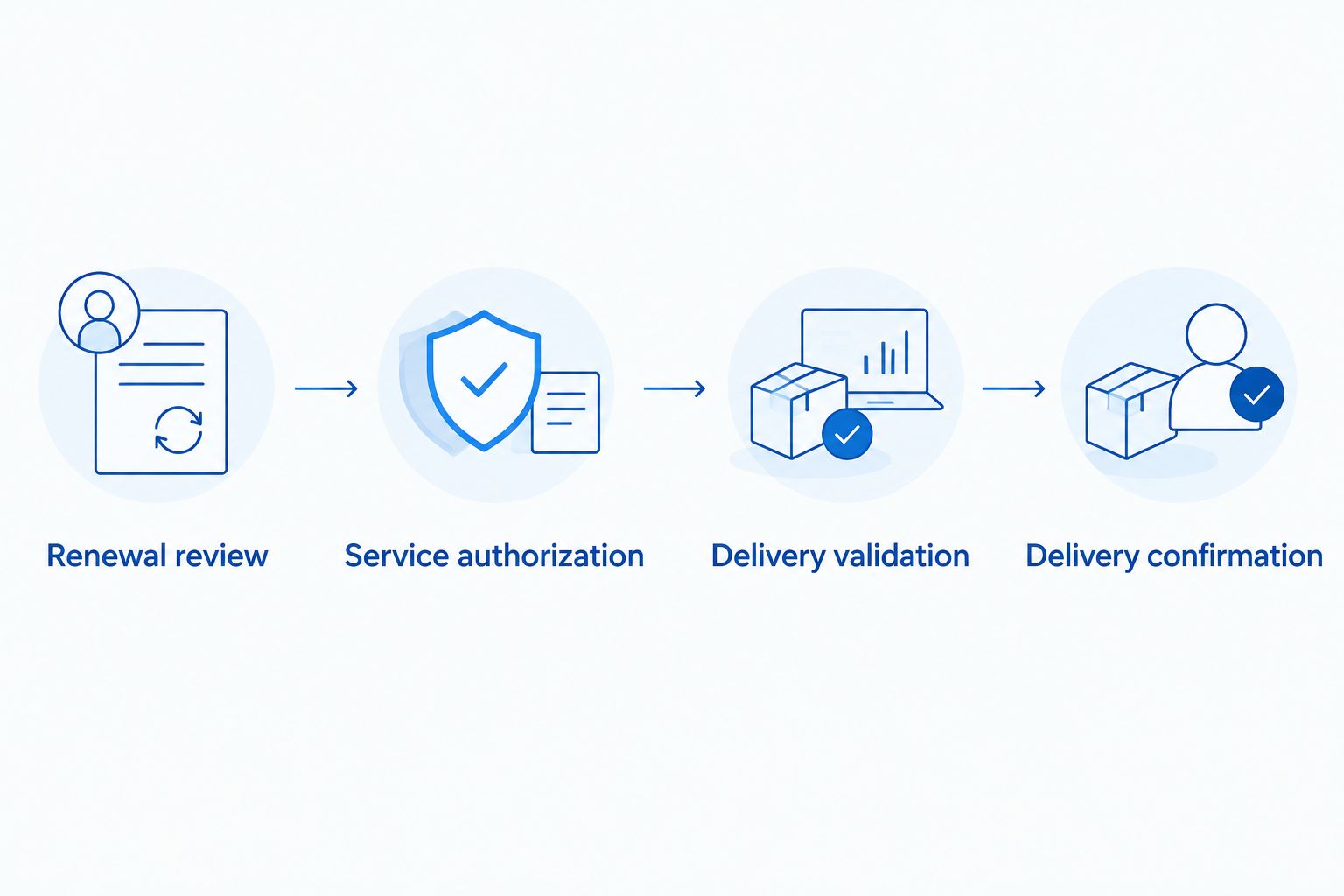
The handoff sequence is Renewal review, Service authorization, Delivery validation, and Delivery confirmation. Each stage needs its own owner and completion evidence.
Delivery record configuration
- Match the approved instruction to the existing participant using Participant identifier. Check for an existing delivery record before creating another one.
- Validate Delivery address, Contact instructions, Authorized service, and Dietary requirements against the approved handoff. Resolve conflicting entries with the responsible owner rather than choosing the newest-looking value.
- Confirm the provider can fulfill the authorized service and the documented dietary requirements. Do not substitute a meal type or service format without the required approval.
- Set Delivery status independently from authorization. Use defined states that distinguish a record awaiting scheduling, a scheduled delivery, and an unresolved delivery exception.
- Apply the approved effective date to the roster change. Check the next affected dispatch before marking the update complete.
Expected result: an approved participant record becomes a verified scheduling instruction, with unresolved fulfillment issues visible to the delivery team.
For the 2026 roster, check both the participant record and the operational schedule after a change. A correct address in the assessment system does not prove that the route record changed.
For broader partner-selection criteria, use the guide to senior meal delivery programs for Area Agencies on Aging. Evaluate the handoff responsibilities alongside the meal service itself.
Delivery confirmation configuration
- Record the scheduling acknowledgment in Handoff acknowledged. An instruction being sent is different from the receiving team accepting it.
- Capture the delivery outcome in Delivery outcome using your provider's agreed definitions. Distinguish completed delivery from a failed attempt or another unresolved event.
- Assign unsuccessful delivery events to Delivery exceptions with a responsible owner and the next action. Follow the program's established participant-contact and escalation procedures.
- Reconcile approved instructions against the active roster and recorded outcomes. Check for approved starts that were never scheduled, changes that were never applied, and duplicate active records.
- Close the handoff only when the receiving team has applied the instruction or documented the exception. Preserve the decision reference so staff can trace the outcome back to its authorization.
Expected result: the agency can distinguish an approved service from an applied roster change and a recorded delivery outcome.
Before rollout, run 5 test cases: an approved continuation, an approved address change, an incomplete review, a duplicate transfer, and an unsuccessful delivery attempt. These are recommended acceptance tests, not reported program results.
For each case, inspect the owner, status, effective date, and receiving record. A test passes when the intended action occurs and the unintended action does not—for example, an incomplete review creates a task without generating an unauthorized roster change.
Update delivery whenever approved details change
A renewal-driven workflow is not enough. A participant can report an address change or updated contact instructions between scheduled reviews, and that operational change still needs a controlled handoff.
Best for: programs handling approved participant updates between assessments. Use a change-triggered variant with the same identifier, approval, acknowledgment, and exception controls as the renewal workflow.
- Capture the requested change in the participant record and identify its source.
- Determine whether it is an operational update or requires a new eligibility or service decision.
- Obtain the required approval and record when the change takes effect.
- Update only the affected delivery fields, then verify the receiving roster.
- Preserve the prior instruction in the audit history rather than erasing the record of what changed.
The advantage is a current delivery record without waiting for the next scheduled review. The limitation is that every changed field needs an ownership rule; otherwise, routine address corrections and service decisions become mixed together.
In your 2026 configuration, use an approved-change event rather than a generic record-saved event. Saving a spelling correction should not create another meal-service enrollment.
Troubleshooting
A pending review removes someone from the roster
Separate Review due from service-end instructions. Restore the record to the status required by the administering agency's documented decision and continuation rules, then correct the trigger that treated a review deadline as a stop authorization.
A repeated transfer creates duplicate deliveries
Match on Participant identifier and the decision's change reference before creating a record. Configure repeated transfers to update or acknowledge the existing instruction, then reconcile any duplicate operational entries before dispatch.
The address changed, but the route did not
Check whether the receiving team acknowledged and applied the change. Compare the authorization's effective date with the affected dispatch, correct the operational record, and leave the exception open until the delivery coordinator verifies it.
Dietary instructions conflict across records
Pause the conflicting service change and send it to the responsible program owner. Use the approved dietary instruction as the fulfillment reference; dispatch staff should not infer a clinical requirement from free-text notes.
The record says active, but no delivery outcome exists
Check scheduling acknowledgment, the dispatch record, and the provider's outcome report separately. An active authorization proves permission to serve, not that a delivery occurred. Assign the missing outcome to delivery operations and document the resolution.
Customize your workflow
Expand the workflow by adding controlled referral intake, approved service changes, and outcome reconciliation—not by combining every process into one status field. Define who owns each additional step before introducing another transfer.
Umoja Health's hunger-relief logistics role belongs in the fulfillment discussion. Keep eligibility assessment, authorized service scope, and provider acknowledgment explicit when coordinating with any food-supply partner.
Protect participant information by restricting each team's access to its operational needs. Delivery staff need usable instructions; they do not automatically need the full eligibility assessment or unrelated health information.
Explore food logistics support
Review hunger-relief and food-supply logistics services for your program's fulfillment needs.
FAQ
How do I connect OAA eligibility renewal to senior meal delivery?
Use a reviewed service authorization between the eligibility record and the delivery roster. Transfer approved instructions, validate the delivery details, and require acknowledgment from the receiving team.
Does an OAA renewal date automatically stop meal delivery?
A review date should not independently generate a service-stop instruction. Apply the administering agency's rules for pending reviews and require the appropriate documented decision before changing service.
Is turning 60 enough to qualify for home-delivered OAA meals?
Age 60 meets the principal federal age threshold, but it does not by itself establish eligibility for home-delivered meals. The administering agency applies the relevant program criteria and assessment requirements.
Is OAA meal eligibility based on income?
OAA nutrition services are not means-tested. Programs use targeting and service criteria under the applicable federal, state, and local framework; staff should not invent an income cutoff.
Do OAA meal participants have to renew every year?
Do not assume a universal annual renewal schedule. Use the assessment and review intervals required by the administering agency for the specific program.
What information should the meal provider receive?
The provider should receive the approved service instruction and the participant information needed to fulfill it. Agree on identifiers, delivery details, relevant dietary requirements, effective dates, and acknowledgment responsibilities before transferring records.
Can Umoja Health make OAA eligibility decisions for our agency?
Keep OAA eligibility decisions with the responsible administering agency. Umoja Health's stated services concern hunger relief and food-supply logistics; those services do not establish eligibility authority.
What should happen after an unsuccessful meal delivery?
Create a delivery exception with an owner and a documented next action. Follow the program's established contact and escalation procedures rather than automatically changing the participant's eligibility status.
One last thing
Test the stop instruction as carefully as the start instruction. A workflow that enrolls correctly can still fail when an outdated decision or duplicate message changes the roster.
For your 2026 acceptance check, require every service-stop instruction to show its authorization, effective date, and receiving acknowledgment. Those records make the action traceable without asking meal operations to reconstruct an eligibility decision.